DDO BER (Drawing and Disbursing Officer Budget Execution Report) is the official online report used by government departments across Pakistan to track budget expenditure, bill status, salary slips, employee information, and vacant/filled posts — all tied to a department’s unique DDO Code.
Whether you’re a Drawing and Disbursing Officer checking your department’s released budget, an accounts clerk verifying a bill’s status, or a government employee downloading a salary slip, this page walks you through exactly how the DDO BER system works, what information you’ll need, and where the official portal currently lives.
What is DDO BER?
Full Form and Meaning
DDO stands for Drawing and Disbursing Officer — a designated government official with the legal authority to draw funds from the treasury and disburse payments on behalf of their department.
Every government office that spends public money — a hospital, a school district, a district administration office — has one or more DDOs assigned to it, each identified by a unique DDO Code.
BER stands for Budget Execution Report — a live, continuously updated financial statement that shows exactly how a department’s allocated annual budget is being used: how much has been released by the finance department, how much has actually been spent, and how much balance remains available for the rest of the fiscal year.
Combined, a DDO BER is the budget execution report generated specifically for one Drawing and Disbursing Officer’s department code — it’s the single most-referenced financial document for day-to-day government accounting in Pakistan.
How DDO BER Works Under PIFRA
DDO BER reports are generated and maintained through the Financial Accounting and Budgeting System (FABS). This digital accounting backbone succeeded the original PIFRA project (Project to Improve Financial Reporting and Auditing).
PIFRA was a World Bank-supported reform project that officially closed in December 2014, and its operational system — FABS — was mainstreamed into the Office of the Controller General of Accounts (CGA), Pakistan.
In practice, this means:
- The PIFRA name is still what most people search for, since it was the project’s original public-facing brand for over a decade.
- The actual live system — where budget data is generated, updated, and reported — is FABS, accessible at fabs.gov.pk.
- Older PIFRA subdomains (like the mobile m.pifra.gov.pk portal) still exist and are used for specific report types, but they can be inconsistent, since PIFRA as a project is no longer actively maintained the way FABS is.
Understanding this distinction matters practically: if a PIFRA link isn’t loading, trying the equivalent function on the FABS portal is often the more reliable route.
What You Need to Check DDO BER
Before you can successfully pull up a DDO BER report, have these three details ready — missing or mismatching any one of them is the most common reason searches return blank results.
DDO Code
A unique numeric or alphanumeric identifier assigned to your specific department or drawing office when it was registered in the accounting system. This code is not something you choose yourself — it’s issued by your department’s accounts office or the relevant Accountant General’s office.
If you don’t know your DDO code, the fastest way to find it is to ask your office’s accounts or admin section, since it typically appears on official salary slips and budget correspondence.
Government Code
A short alphabetic code that tells the system which tier of government your department belongs to — Federal, Punjab, Sindh, KPK, and so on.
This determines which database your DDO code is searched against, so entering the wrong Government Code (for example, searching a Punjab DDO code under the Federal code) will return no results even if your DDO code itself is correct.
Fiscal Year
Pakistan’s government fiscal year runs from July to June — so “fiscal year 2025” actually refers to July 2024–June 2025, not the calendar year.
Budget and expenditure data are filtered strictly by fiscal year, so if you’re checking a recent transaction and getting no data, double-check you’ve selected the correct year rather than assuming the portal is broken.
How to Check DDO BER Online (Quick Steps)
- Open the official portal — use the tool above, or go directly to fabs.gov.pk.
- Select the correct Fiscal Year from the dropdown — this must match the period you’re checking.
- Enter your Government Code — see the full code table further down this page if you’re unsure which one applies to you.
- Enter your DDO Code — exactly as issued, including any leading zeros.
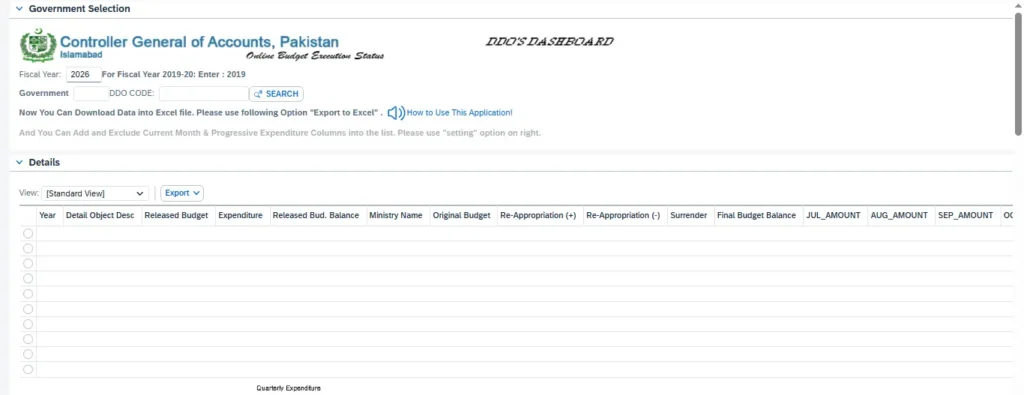
- Click Search — your Budget Execution Report will load as a table showing expenditure, released budget, and balance figures.
- Use “Export to Excel” if you need the data offline — most DDO BER dashboards support this for record-keeping and reporting purposes.
Full walkthrough with screenshots and province-specific login steps: [Read the complete Login & Registration Guide →]
Understanding Your DDO BER Report Columns
Once your report loads, you’ll see a data table with several columns that can be confusing if you’re checking DDO BER for the first time. Here’s what each one actually means:
- Expenditure — the category or head of account the spending falls under.
- Detail Object Doc — the specific object code/document reference tied to that line item, used for detailed audit tracing.
- Original Budget — the amount initially allocated to this budget line at the start of the fiscal year, before any revisions.
- Released Budget — the portion of the original budget that has actually been authorized for spending so far (departments don’t always get their full annual budget released at once).
- Released Bud. Balance — how much of the released budget remains unspent.
- JUN_AMOUNT — the expenditure recorded specifically for June, often shown separately since it’s the final month of the fiscal year and tends to see a spending push before year-end closing.
- Final Budget — the adjusted total budget figure after any in-year revisions or supplementary grants.
- Final Budget Balance — the remaining unspent balance against the final (revised) budget — this is usually the most important figure for year-end reconciliation.
Knowing what each column represents makes it much easier to spot a discrepancy — for example, a large gap between Released Budget and Released Bud. Balance near year-end is often the first sign of unspent funds that need to be accounted for before the fiscal year closes.
What You Can Check Using DDO BER
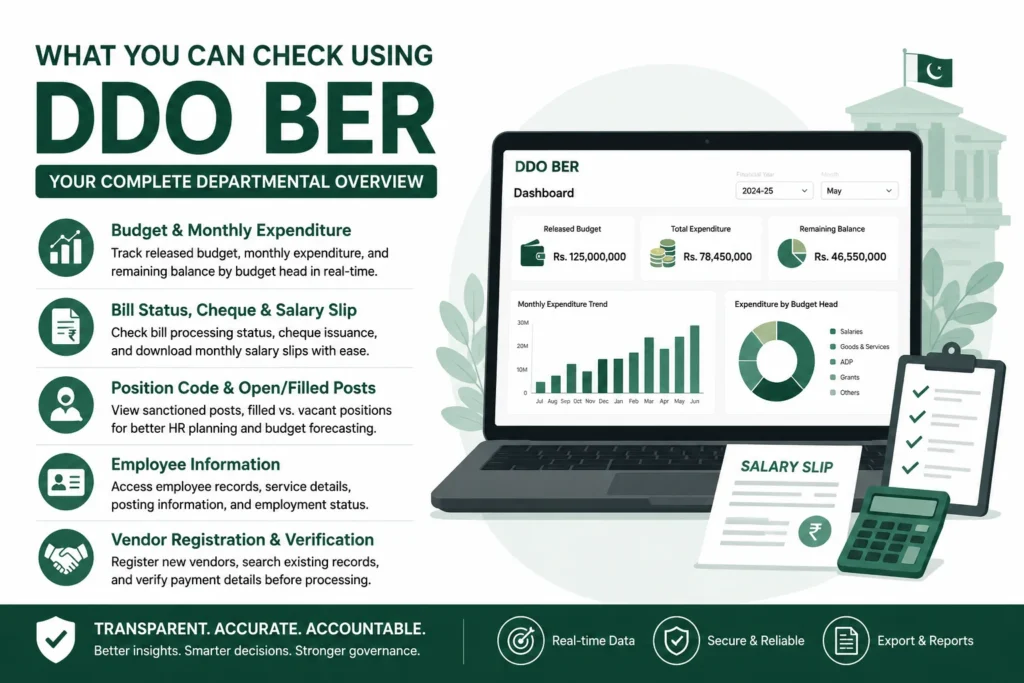
Budget & Monthly Expenditure
Your DDO BER dashboard shows real-time figures for released budget, month-by-month expenditure, and remaining balance — broken down by budget head.
This is the primary tool departments use to avoid overspending and to plan the remainder of the fiscal year based on actual, not estimated, figures. Reports can typically be filtered by month and exported for internal record-keeping. [Read full guide on DDO Ber Budget Check →]
Bill Status, Cheque & Salary Slip
Beyond budget tracking, the system lets you check whether a submitted bill has been processed, view cheque issuance status, and — for individual employees — download your monthly salary or pay slip directly.
This is one of the most frequently checked functions on a day-to-day basis, since it directly affects when payments and salaries are disbursed. [Read full guide on DDO Ber Bill Status, Cheque & Salary Slip →]
Position Code & Open/Filled Posts
Every department has a set of sanctioned posts approved in its budget.
The DDO BER system lets you look up how many of those posts are currently filled versus vacant, which is essential both for HR planning and for budget forecasting, since vacant posts directly affect a department’s salary expenditure projections. [Read full guide on DDO Ber Position Code & Open/Filled Posts →]
Employee Information Check
Departments can view registered employee records linked to their DDO code — basic service details, posting information, and status — useful for verifying records match what’s on file with the accounts office, especially during audits or transfers. [Read full guide DDO Ber Employee Information Check →]
Vendor Registration & Verification
Government departments regularly make payments to external vendors and suppliers.
This module lets a department register a new vendor, search existing vendor records, and verify payment details before processing a transaction — an important step in preventing payment errors or fraud. [Read full guide DDO Ber Vendor Registration & Verification →]
Government Codes for PIFRA/FABS
Selecting the correct Government Code is one of the most common points of confusion for first-time users. Use this table to find yours before entering your DDO Code:
| Code | Government / Sector |
|---|---|
| F | Federal |
| P | Punjab |
| S | Sindh |
| N | KP (Khyber Pakhtunkhwa) Government |
| B | Balochistan |
| DGP | District Government Punjab |
| DGN | District Government KP |
| K | Kashmir |
| GB | Gilgit-Baltistan |
| GBC | GB Council |
| C | Kashmir Council |
If you’re part of a district-level office rather than a provincial department, note that Punjab and KP each have a separate District Government code (DGP/DGN) distinct from their main provincial code (P/N) — using the wrong one of the two is a common mistake even among regular users.
Why Checking Your DDO BER Regularly Matters
Reviewing your department’s DDO BER isn’t just a compliance formality — it has direct, practical benefits:
- Catching errors early. A misallocated expenditure or an incorrectly recorded bill is far easier to correct in the same month it happens than after the fiscal year closes.
- Maintaining a clear audit trail. Every rupee of government spending eventually goes through an audit process, and a department that checks its DDO BER regularly has a much easier time reconciling records when auditors come calling.
- Better year-round planning. Knowing your real released budget and balance — rather than working off the original allocation — means departments can plan procurement, hiring, and spending decisions around actual available funds.
- Avoiding year-end surprises. Since the fiscal year closes in June, departments that only check their DDO BER once a year risk discovering unspent funds, budget shortfalls, or reconciliation issues far too late to act on them.
As Pakistan’s public financial management continues to digitize under FABS, the DDO BER has increasingly become the primary reference point for department-level financial accountability — not an occasional lookup, but a routine part of good government accounting practice.
DDO BER by Province
While the underlying DDO BER system is unified under FABS, the Government Code you use — and in some cases the specific login flow — differs by province:
- Punjab — Government Code P for provincial departments, DGP for district-level offices.
- Sindh — Government Code S.
- KPK — Government Code N for provincial departments, DGN for district-level offices.
- Federal — Government Code F, covering federal ministries and attached departments.
Each province’s departments use the same FABS portal and report format — the only real difference is which Government Code and, occasionally, which regional login path applies. [ Read our province-wise guide to DDO BER login and registration codes ].
DDO BER Login Issues? Quick Fixes
Government portals — both FABS and the legacy PIFRA subdomains — can occasionally be slow to load or temporarily unreachable.
This is a known characteristic of these servers, especially during peak usage periods like month-end and fiscal year-end closing (typically the last week of June), and it’s not something wrong on your end. A few things worth trying before assuming the system is down:
- Wait and retry — these portals often recover within a few minutes rather than staying down for extended periods.
- Double-check your Fiscal Year and Government Code — a “not working” result is often actually a data-mismatch, not a server error.
- Use fabs.gov.pk directly rather than older bookmarked PIFRA subdomain links, since FABS is the actively maintained system.
- Try a different browser or clear your cache — some older government portals don’t render correctly on every browser.
Full troubleshooting guide: [Read DDO BER Not Working? →]