
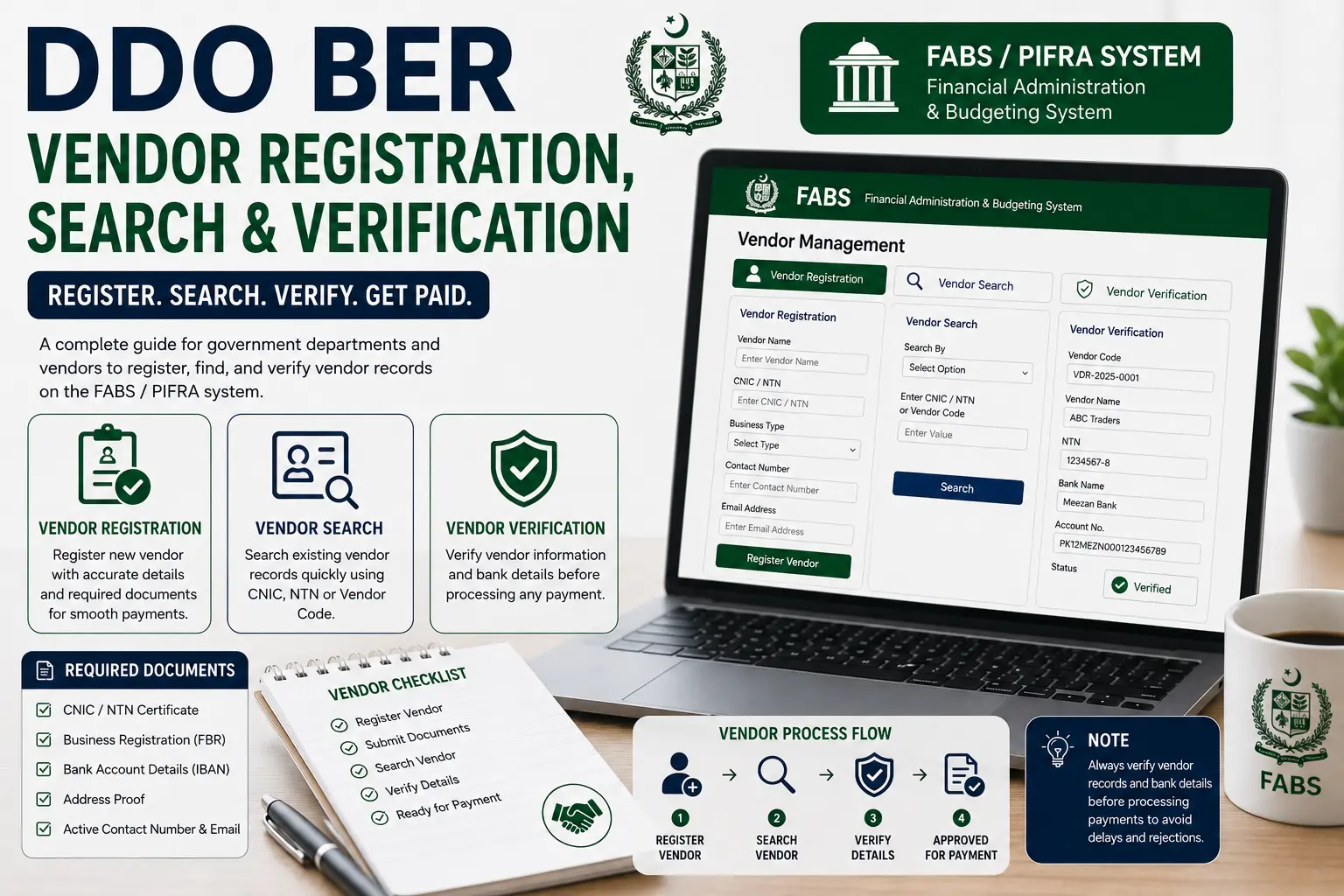
DDO BER Vendor Registration, Search & Verification covers the process that government departments and their suppliers use to register a new vendor, look up existing vendor records, and confirm payment details before a transaction is processed.
Getting this right matters — an unverified or incorrectly registered vendor record is one of the most common reasons a payment gets delayed. This guide walks through registration, search, verification, and the documents you’ll need at each stage.
How to Register as a Vendor on PIFRA
Vendor registration is the first step for any supplier that wants to receive payments from a government department through the FABS/PIFRA system.
- Go to the official portal (fabs.gov.pk) or use the guided tool on our homepage, and locate the Vendor Registration section.
- Select the department you’re registering with, using their Government Code and DDO Code.
- Fill in your vendor details — business/individual name, contact information, bank account details, and tax registration number where applicable.
- Upload supporting documents (covered in detail further down this page).
- Submit the registration for review by the relevant department’s accounts office.
- Wait for confirmation — once approved, you’ll be issued a vendor number used for all future transactions with that department.
Documents You’ll Need Before You Start
Having your paperwork ready before you begin the online form saves a lot of back-and-forth.
At minimum, most departments require a valid CNIC (for individuals) or business registration certificate, a bank account maintained in the vendor’s registered name, and an NTN (National Tax Number) if applicable to the type of goods or services being supplied.
Registration Approval Timeline
Approval isn’t instant — the department’s accounts office reviews each submission manually, and turnaround time varies depending on department workload. It’s reasonable to follow up if you haven’t heard back within one to two weeks, but treat that as a normal check-in rather than a sign something has gone wrong.
How to Search Vendor Information
Once a vendor is registered, both the department and (in some cases) the vendor themselves can search for existing vendor records:
- Open the Vendor Information module on the FABS portal.
- Search by vendor number, name, or registered bank account details, depending on what you already have on hand.
- Review the returned record — registered name, contact details, bank account, and registration status will display.
- Cross-check against your own records before processing a payment, especially if it’s been a while since the vendor’s details were last confirmed.
This search function is particularly useful for accounts staff processing a bill payment, since it lets them confirm a vendor’s registered bank details match what’s on the payment instruction before a cheque or transfer is issued — catching a mismatched account before money moves, rather than after.
Vendor Verification Process
Verification is a distinct step from registration — it’s the check that confirms a vendor’s details are still accurate and valid before a payment goes out, particularly important if some time has passed since the original registration.
- Bank account verification — confirming the registered account is still active and belongs to the vendor on record, since accounts can be closed or changed without the vendor formally updating their registration.
- Status check — confirming the vendor’s registration is still active rather than suspended or flagged for a documentation issue.
- Cross-department consistency — for vendors working with multiple government departments, checking that the core details (name, NTN, primary bank account) are consistent across each department’s records.
DDO BER Vendor Registration, Search & Verification
Put together, these three steps form a single practical workflow: a department registers a new vendor once, searches that vendor’s record whenever a transaction comes up, and verifies the details periodically (or before any large payment) to make sure nothing has changed since the last check.
Skipping the verification step is one of the more common — and avoidable — causes of payment delays or misdirected funds in government transactions.
Required Documents for Vendor Registration
Exact requirements can vary slightly by department, but the following are consistently required:
Individual / Sole Proprietor Vendors
- Valid CNIC copy
- Bank account maintenance certificate or a cancelled cheque showing the account title
- NTN certificate, if the goods/services supplied require tax registration
Company / Firm Vendors
- Business registration certificate (SECP registration, partnership deed, or equivalent depending on business structure)
- Company bank account details, matching the registered business name exactly
- NTN and, where applicable, GST/Sales Tax registration certificate
- Authorization letter naming the individual submitting the registration on the company’s behalf
Submitting mismatched details — for example, a bank account not held in the exact registered business name — is one of the most common reasons a vendor registration gets sent back for correction rather than approved on the first submission.
FAQs
How do I register as a vendor for DDO BER payments?
Submit your details, bank account information, and required documents through the Vendor Registration section of the FABS portal for the specific department you’re supplying.
How long does vendor registration approval take?
It varies by department, but one to two weeks is a reasonable expectation before following up.
How do I search for an existing vendor record?
Use the Vendor Information module and search by vendor number, name, or bank account details.
Why would a vendor verification fail?
Most commonly, a closed or changed bank account, mismatched registered name, or an expired document that hasn’t been updated with the department.
Do I need to register separately with each government department I supply?
Generally yes — vendor registration is tied to each department’s own DDO Code, so working with multiple departments typically means registering with each individually.
What documents are required for company vendor registration?
Business registration certificate, company bank account details, NTN/tax registration, and an authorization letter for the person submitting the registration.