
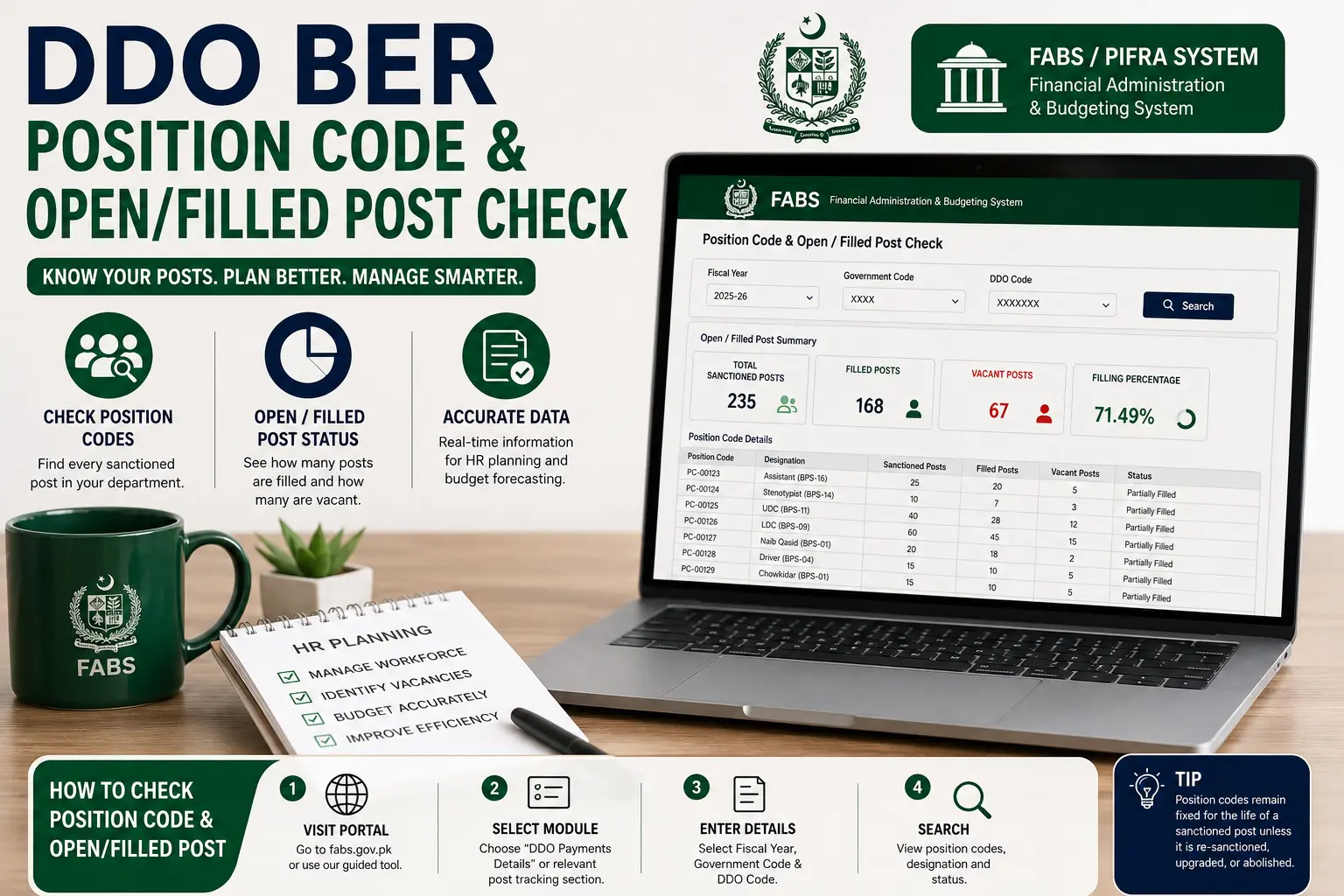
A DDO BER Position Code & Open/Filled Post Check shows exactly how many sanctioned posts a government department has, how many are currently filled, and how many remain vacant.
It’s one of the most useful — and most searched — functions on the FABS/PIFRA system, since it feeds directly into both HR planning and budget forecasting.
This guide covers how to look up your position code, run an open/filled post check, and what to expect if you’re checking for Punjab, Sindh, KPK, or a Federal department.
How to Check Your DDO BER Position Code
Every sanctioned post within a department is tied to a unique position code, which is assigned when the post is approved and budgeted. Here’s how to look yours up:
- Go to the official FABS portal (fabs.gov.pk) or use the guided tool on our homepage.
- Select the relevant module — usually listed as “DDO Payments Details” or a similarly named position/post tracking section.
- Enter your Fiscal Year, Government Code, and DDO Code.
- Search, and the system will return a list of position codes associated with your department, along with each position’s designation and status.
Position codes are internal to the accounting system rather than something a department assigns itself, so if you don’t already know a specific code, your department’s accounts or HR section is the fastest way to confirm it.
It’s also worth noting that position codes generally stay fixed for the life of a sanctioned post — they only change if the post itself is re-sanctioned, upgraded, or abolished.
Open and Filled Post Check (Step by Step)
Once you’re viewing your department’s position codes, checking which posts are open versus filled follows the same basic flow:
- Pull up your full list of sanctioned posts using your DDO Code, as above.
- Look at the status column next to each position code — this typically indicates “Filled,” “Vacant,” or occasionally a specific note about a post being under process (e.g., recently vacated, or a new appointment pending finalization).
- Cross-check the count — most departments track a running total of open posts internally; comparing this against the portal figure is a good way to confirm both records agree.
- Export the list if you need it for a hiring request, budget submission, or internal HR review — most dashboards support downloading to Excel.
If a post you know to be recently filled is still showing as vacant, this is usually a data lag rather than an error — appointment records can take some time to sync into the system after the formal joining date.
Filled and Vacant Posts Explained
Understanding these two statuses clearly matters, since they get used interchangeably in casual conversation but mean specific things in the system:
- A filled post is a sanctioned position that currently has an employee formally appointed and recorded against it in the system.
- A vacant post is a sanctioned position with no employee currently recorded against it — it may be temporarily unfilled while recruitment is underway, or it may have been vacant for a longer period due to budget constraints, retirement, or transfer.
The distinction matters for budgeting because a vacant post typically means that portion of the salary budget isn’t being drawn — which is exactly why the open/filled post check is so closely tied to the budget expenditure figures we cover in our DDO BER Budget Check guide.
A department with a high number of vacant posts will usually show correspondingly lower salary expenditure than its full sanctioned strength would suggest.
Sanctioned Post vs Filled Post
These two terms are often confused, so it’s worth being precise:
- A sanctioned post is a position that has been formally approved and budgeted for by the relevant finance authority — it exists on paper (and in the budget) whether or not anyone currently occupies it.
- A filled post is the subset of sanctioned posts that currently have an employee appointed against them.
In other words: sanctioned posts = filled posts + vacant posts. A department’s total sanctioned strength doesn’t change often (it requires formal approval to add or remove a post), while the filled/vacant split can shift regularly as staff join, transfer, or retire.
When reviewing your DDO BER Position Code report, always check the sanctioned total first — it gives you the baseline the filled and vacant figures are measured against.
Position Code Check by Province
While the position code and open/filled post check process is the same across the FABS system, the Government Code you use — and occasionally login specifics — differ by province.
Punjab
Use Government Code P for provincial departments, or DGP for district-level offices.
Punjab has one of the largest volumes of sanctioned posts in the system given the size of its provincial government, so double-checking you’re using the correct district vs. provincial code matters more here than in smaller provinces.
Sindh
Use Government Code S. Sindh’s departments follow the same position code structure as other provinces, with sanctioned posts tracked at the department level under each DDO Code.
KPK (incl. district-level example)
Use Government Code N for provincial departments, or DGN for district-level offices.
For example, a district administration office based near Abbottabad would typically fall under the district-level code (DGN) rather than the main provincial KP code — a distinction that trips up first-time users searching for their local office’s position codes.
Federal
Use Government Code F for federal ministries and attached departments.
Federal position codes follow the same sanctioned/filled/vacant structure, though federal departments often have a more centralized recruitment and appointment process, which can affect how quickly a newly filled post reflects in the system.
FAQs
How do I find my DDO BER Position Code?
Search using your Government Code and DDO Code on the FABS portal (or our homepage tool) — the system returns all position codes linked to your department.
What’s the difference between a sanctioned post and a filled post?
A sanctioned post is any formally approved position, whether occupied or not. A filled post is a sanctioned post that currently has an employee appointed against it.
Why does a recently filled post still show as vacant?
This is usually a data sync delay — appointment records can take time to update in the system after the actual joining date.
Do position codes change over time?
Generally no — a position code stays fixed for the life of that sanctioned post, unless the post is formally upgraded, re-sanctioned, or abolished.
Is the Government Code the same for provincial and district offices?
No — Punjab and KP each have separate codes for provincial (P/N) versus district-level (DGP/DGN) offices, and using the wrong one is a common source of confusion.
Can I check open/filled posts for a Federal department the same way?
Yes, the process is identical — just use Government Code F along with your DDO Code.
Conclusion
A DDO BER Position Code & Open/Filled Post Check is one of the more practically useful reports on the entire FABS system, tying directly into both HR planning and budget accuracy.
Once you understand the difference between a sanctioned post, a filled post, and a vacant post — and you’re using the correct Government Code for your province or district — running this check takes just a couple of minutes and gives you a far more accurate picture than working from memory or outdated internal records.
Checking it regularly, rather than only when a specific question comes up, is the best way to keep your department’s HR and budget planning aligned with what the system actually shows.