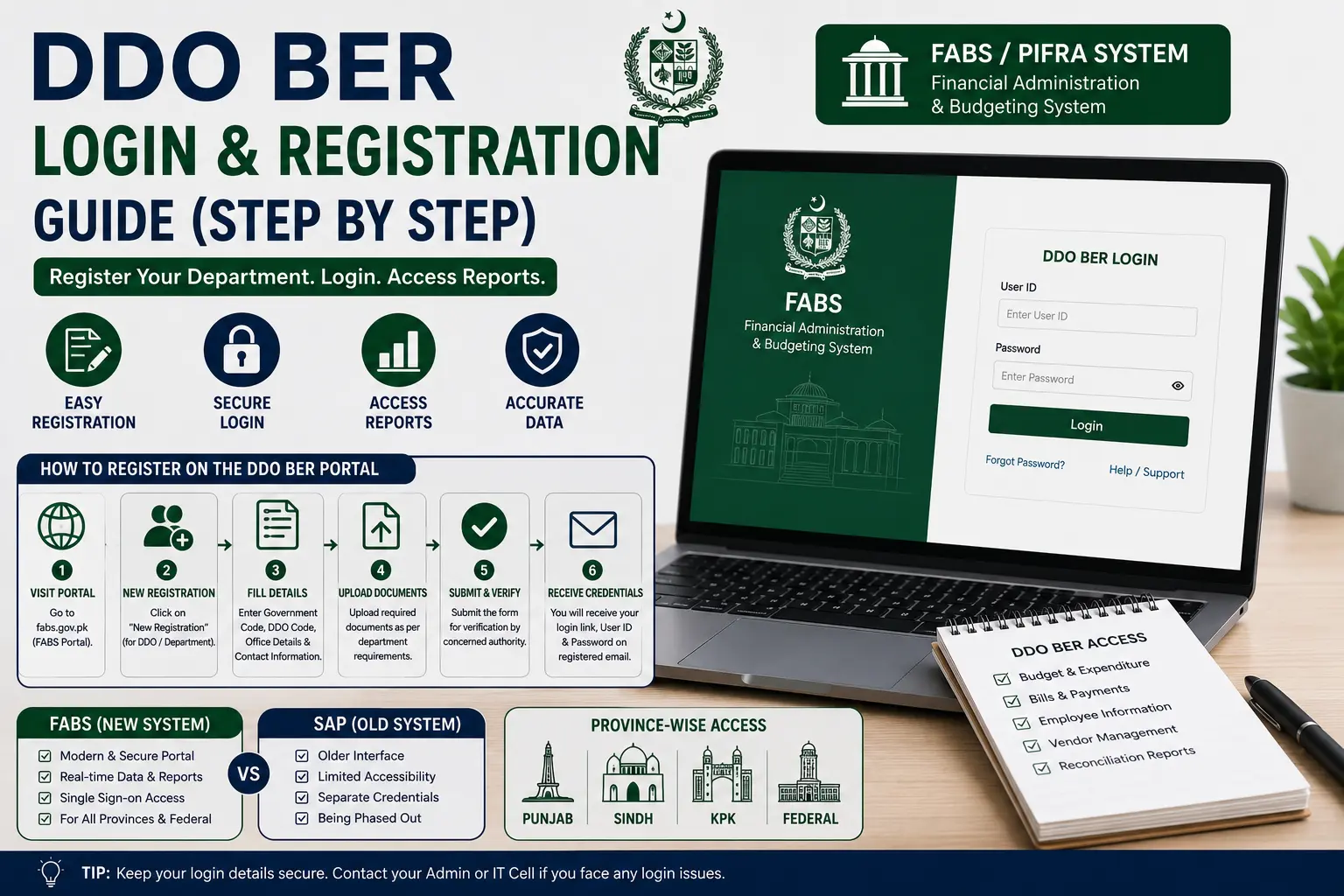
This DDO BER Login & Registration Guide walks through exactly how to register your department on the FABS/PIFRA system and log in to check your reports — covering the process for Punjab, Sindh, KPK, and Federal departments.
The difference between FABS and older SAP-based logins, and what to do if your password or login link stops working.
How to Register on the DDO BER Portal
Before you can log in and check any report, your department needs to be registered in the system with a valid DDO Code and Government Code.
- Contact your department’s accounts office or the relevant Accountant General’s office — DDO registration isn’t a self-service signup; it’s issued through the formal government accounting structure when a Drawing and Disbursing Officer post is sanctioned.
- Provide the required department details — office name, designation of the DDO, and the relevant Government Code for your province or federal tier.
- Receive your DDO Code once registration is processed — this becomes your permanent identifier for all future logins and report checks.
- Confirm your details are active by running a test login on the FABS portal once you have your code.
If your department already exists in the system but you’re a newly posted DDO taking over the role, you typically don’t need a fresh registration — you’ll use the existing DDO Code tied to that post, updated with your name in the department’s internal records.
How to Log in to DDO BER (Step-by-Step)
Once registered, logging in to check your reports follows the same basic steps regardless of which module you’re using:
- Go to the official FABS portal (fabs.gov.pk) or use the guided tool on our homepage.
- Select the Fiscal Year you want to check.
- Enter your Government Code — Federal, Punjab, Sindh, KPK, or one of the district-level codes.
- Enter your DDO Code.
- Click Search or Login to access your department’s dashboard.
Unlike a typical website login, there’s usually no separate username/password screen for basic report viewing — your Government Code and DDO Code function as your access credentials for most public-facing modules.
DDO BER Login by Province
While the login mechanics are the same across the FABS system, the Government Code — and in some cases the specific office you register through — differs by province.
Punjab Login
Use Government Code P for provincial departments, or DGP for district-level offices. Punjab departments register through their respective Accountant General Punjab office.
Sindh Login
Use the Government Code S. Sindh departments register and log in the same way, through the Accountant General Sindh office for initial DDO Code issuance.
KPK Login
Use Government Code N for provincial departments, or DGN for district-level offices — for example, a district administration office would typically fall under the DGN code rather than the main provincial N code.
Federal Login
Use Government Code F, covering federal ministries and attached departments, registered through the relevant federal Accountant General’s office (AGPR).
FABS vs SAP Login Differences
You may come across references to both “FABS” and “SAP” logins when researching DDO BER — here’s the distinction:
- FABS is the current, publicly accessible reporting portal (fabs.gov.pk) where departments and the public check budget, bill, and employee reports.
- SAP refers to the underlying enterprise accounting software that processes the actual government financial transactions behind the scenes — it’s an internal system used by accounts staff, not something the general public logs into directly.
In practice, when a competitor site or older resource mentions a “SAP login” for DDO BER, they’re usually referring to internal departmental access rather than the public reporting portal — for checking your own department’s reports, FABS is the correct entry point.
Forgot Password / Login Link Not Working
Since most public report-checking on FABS doesn’t use a traditional password (just your Government Code and DDO Code), a “forgot password” situation is less common than on typical websites — but a few related issues do come up:
- Login link not loading — try the current FABS portal directly rather than an older bookmarked PIFRA link, since legacy subdomains are maintained less consistently.
- DDO Code not recognized — double-check with your accounts office that your code is correctly registered and active, especially if you’re newly posted to a DDO role.
- Internal staff SAP access issues — if you’re accounts staff with actual internal system credentials (separate from public report viewing) and have forgotten your password, that reset needs to go through your department’s IT or accounts administration, not the public FABS portal.
DDO BER Login & Registration Guide: Quick Recap
To summarize this DDO BER Login & Registration Guide in one place: registration happens through your department’s accounts office and issues a permanent DDO Code; logging in to check reports uses that DDO Code plus your Government Code on the FABS portal; and province-specific differences come down to which Government Code applies to you, not a fundamentally different process.
FAQs
How do I register my department for DDO BER?
Registration is handled through your department’s accounts office or the relevant Accountant General’s office — it’s not a self-service online signup.
Do I need a password to check DDO BER reports?
For most public report-checking, your Government Code and DDO Code serve as your access credentials — a separate password is generally only relevant for internal staff with SAP system access.
What Government Code should I use for Punjab or KPK?
Use P for Punjab provincial departments (DGP for district-level), and N for KPK provincial departments (DGN for district-level).
Is FABS the same login as SAP?
No — FABS is the public reporting portal, while SAP is the internal accounting system used by government accounts staff, not accessed directly by the public.
What do I do if my DDO Code isn’t recognized during login?
Confirm with your accounts office that the code is correctly registered and currently active, particularly if you’ve recently taken over the DDO role.
Why does an old PIFRA login link not work anymore?
Older PIFRA subdomains are maintained less consistently than the current FABS portal — try fabs.gov.pk directly if a legacy link fails.
Conclusion
This DDO BER Login & Registration Guide covers the two things most first-time users get stuck on: how registration actually works (through your accounts office, not a self-service form) and how login differs slightly by province through the Government Code rather than a separate login process altogether.
Once your DDO Code is active, checking reports on FABS takes just a few steps, and understanding the FABS-vs-SAP distinction clears up a lot of the confusion floating around older PIFRA content.
Bookmark the current FABS portal rather than legacy links, and registration and login should stay straightforward going forward.